

Students gain knowledge, skills and experiences with a variety of information and communication technologies relevant to educational contexts, create instructional materials and resources, and examine critical issues related to information technologies used in instructional settings.
I expected this course to be a survey of current technologies and how they are applied in various classroom settings. In addition to a collaborative project that I completed with two other students, we were challenged with weekly readings from the academic literature. We were also tasked with writing two independent research papers on technology topics of our choice. The literature readings tilted toward K-12 instruction, which I expected but which at the moment does not align with my past experience or future aspirations. One never knows, though: I might well find myself in a designer/developer position in a K-12 setting in the future. So I tried to keep an open mind and think through the issues the readings addressed from all possible perspectives: K-12, university, corporate training, and even community job corps development. The readings and the independent research papers gave me a taste of what it is like to do scholarly research in this day and age. What stands out most in my mind is the strong use of quantitative methods to analyze data collected from learners (and teachers). This is an area I will need additional coursework and practice in in future courses.
In deciding which aspect of the ADDIE paradigm the topics covered apply to, one can easily see that as a tool, current technologies can apply to any of the five steps, depending on what the tool does and who the target audience is. Flip, the tool we reviewed in the collaborative project below, applies to the I phase of ADDIE: implementation. We collected data from the learner interactions and used Google Classroom to crunch those data as part of a mini-summative evaluation, thereby touching the E phase of ADDIE as well.
Work Samples
Simulation Tutorial
Here’s a short video tutorial I created in Adobe Captivate 2019 for a collaborative project in this course. The topic the team settled on involved evaluating the efficacy of Flip as a teaching tool to remote foreign language learners. Our target audience is young adult learners (ages 18-25) whose native language is not English and who may be using Flip for the first time. I believe it’s also a good refresher tutorial for those who may have used Flip in the past and need a review of basic techniques to create their own video.
Collaborative Report
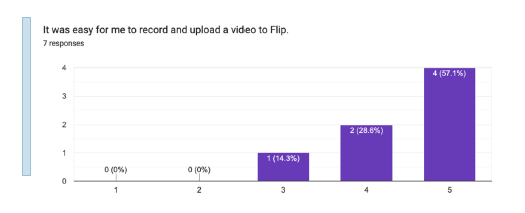
Below is the report I submitted, along with fellow students Raenalyn Maralit and Tanner Morrison, for the same topic. The concept for the topic came from Raen, an experienced foreign language and ESL teacher who was teaching Filipino students Japanese remotely. We wanted to explore whether these students would find Flip to be useful in helping them overcome their apprehension in speaking a foreign language, a common fear to be sure, as I, a former teaching assistant in Russian, can attest. In addition to creating the tutorial, I created the Kirkpatrick level 1 survey we distributed to 73 of Raen’s recent students, all at the college level. Though the response rate was low, we feel the feedback we got on Flip was useful and beneficial.
Final Grade: A
 Beth's Journey Through the Instructional Design Universe