This hierarchy reflects all I would expect to include in a comprehensive basic navigation course. Topics highlighted in pink are those included in this capstone project.
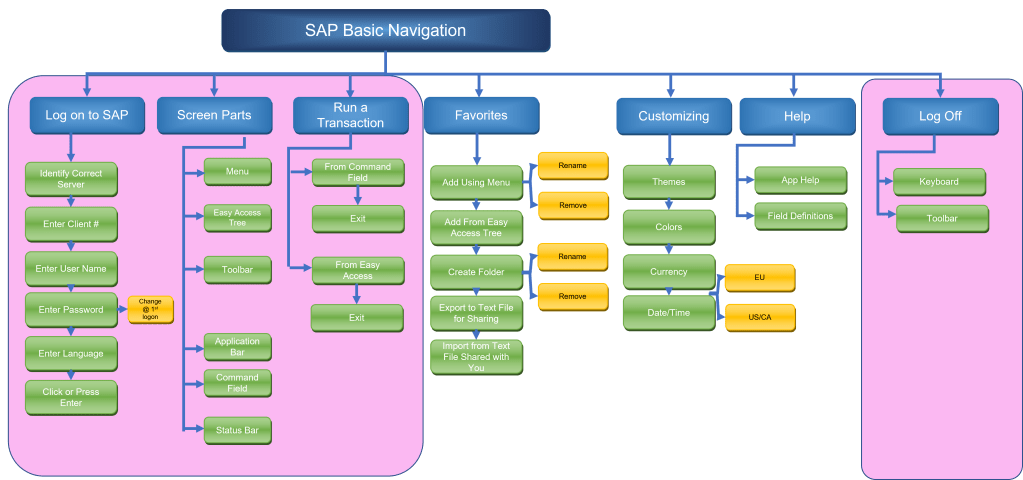
It looks like a lot, but the explanations of the screen parts go by quickly. In an ILT session, I would expect the bulk of the time on this unit to be consumed by the third branch, running a transaction. An instructor that can manage the classroom environment well (one of the 14 competencies IBSTPI specifies for a Certified Technical Trainer, CTT+) would be able to manage questions from learners on such things as how do we know what the transaction codes are, what happens when we run one, how do we get out of it, and so forth. There are always one or more learners in the class who learn kinesthetically and want to poke around in the system and see what happens when they enter such-and-such. I am one of those myself. Such learners can easily take an ILT session off the rails without a competent instructor to bring the class back to the topic at hand.
The first branch of the content hierarchy lends itself to a mnemonic for remembering what to enter to log on. Client-Username-Password-Language = CUPL. There are only a “CUPL” things you need to know to log on! (four, actually, but close enough 🙂 )
The third branch, running a transaction, lends itself to a reflection strategy on how users will choose to do these tasks. Some users like to type, and would just type a transaction code in the Command field. Others don’t like to type, or have fat fingers, and may prefer to drill into the Easy Access tree by double-clicking until they find what they want. In this unit, these are the only two techniques to be shown for now. Additional techniques would be demonstrated and practiced in subsequent units of the course which are outside the scope of this capstone project.
 Beth's Journey Through the Instructional Design Universe